Rank customers by total sales invoice amount with XLSX export
Description
Adds an Accounting report that ranks customers by their total sales invoice amount, with each customer’s share of the filtered grand total, and an XLSX export of the ranking.
Author
Cloudia
Copyright
Copyright (c) 2025-Present Cloudia Systems S.A.C.
License
OPL-1
Version
18.0.1.2
Dependencies
account
sale
1. User instructions
Accounting readonly users: Contabilidad → Informes → Gestión → Informe de Clasificación de Clientes.
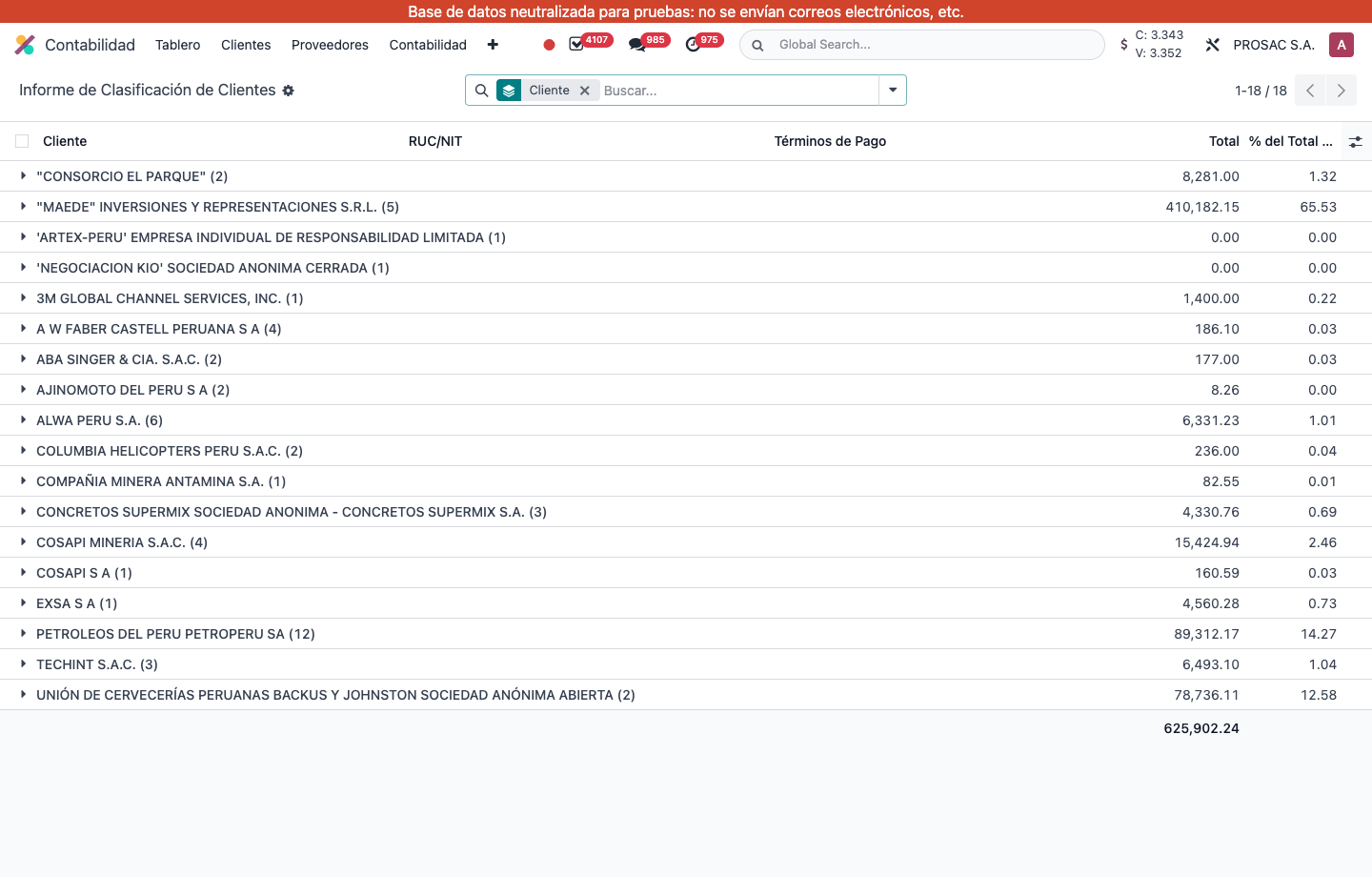
The list opens grouped by Cliente. Each group shows invoice count, RUC/NIT, Términos de Pago, Total (company currency) and % del Total General (share of the filtered grand total; it recalculates when filters or group-by change).
Filter by customer, currency or Fecha de Factura. Group by customer or currency.
Expand a group to see the underlying invoices. Use Acciones → Exportar a XLSX for a spreadsheet (customer, VAT, company-currency total, %).
Informe de Clasificación de Clientes: totals and % del Total General per customer.
Access is limited to the Accounting readonly group. Only companies in your allowed companies are included.
Informe de clasificación de clientes por monto
Nombre técnico: cs_account_report_sale_ranking
Nombre
Customer Ranking Report by Amount
Resumen
Clasifica clientes por el total de facturas de venta, con exportación XLSX
Descripción
Agrega un informe de Contabilidad que ordena clientes por el total de facturas de venta, con la participación de cada uno en el total filtrado, y exportación XLSX.
Autor
Cloudia
Copyright
Copyright (c) 2025-Present Cloudia Systems S.A.C.
Licencia
OPL-1
Versión
18.0.1.2
Dependencias
account
sale
1. Instrucciones de usuario
Usuarios de solo lectura de Contabilidad: Contabilidad → Informes → Gestión → Informe de Clasificación de Clientes.
La lista abre agrupada por Cliente. Cada grupo muestra la cantidad de facturas, RUC/NIT, Términos de Pago, Total (moneda de la empresa) y % del Total General (participación del total filtrado; se recalcula al cambiar filtros o agrupación).
Filtre por cliente, moneda o Fecha de Factura. Agrupe por cliente o moneda.
Expanda un grupo para ver las facturas. Use Acciones → Exportar a XLSX para una hoja (cliente, RUC, total en moneda de la empresa, %).
Informe de Clasificación de Clientes: totales y % del Total General por cliente.
El acceso es del grupo de solo lectura de Contabilidad. Solo entran las compañías permitidas.