Link related opportunities together with bidirectional cross-references
Description
Lets you relate an opportunity to other open opportunities of the same customer (or commercial entity). The link is written on both sides. A smart button opens the related records. Search also matches related quotation names and ordered products.
Author
Cloudia
Copyright
Copyright (c) 2025-Present Cloudia Systems S.A.C.
License
OPL-1
Version
18.0.1.0
Dependencies
crm
sale_crm
1. User instructions
Link opportunities of the same customer
Open an opportunity that already has a Contacto.
On the right, in Oportunidades vinculadas, pick one or more opportunities.
Only active opportunities of that partner or commercial entity, with probability greater than 0, appear in the list.
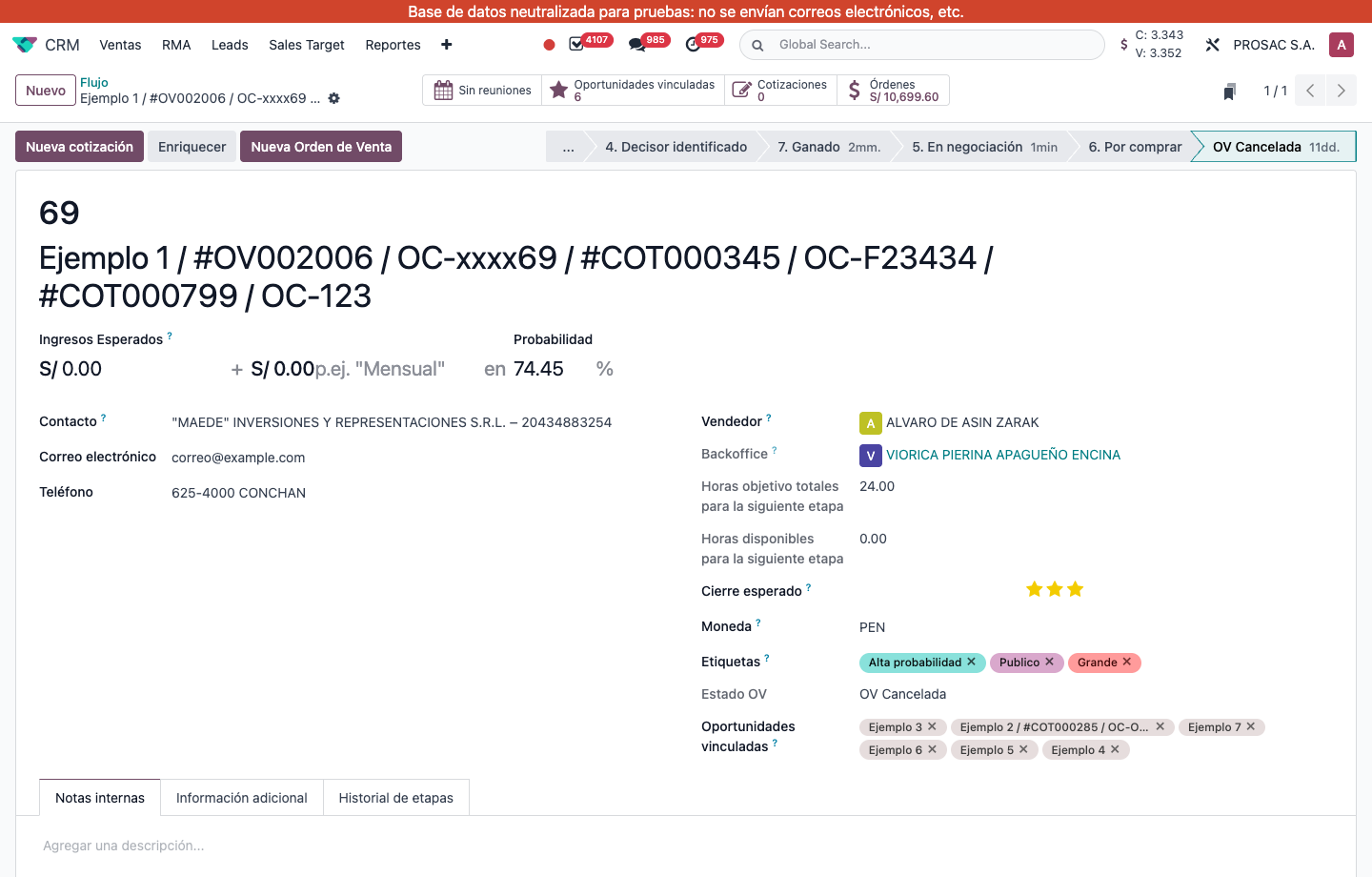
Opportunity 69: Oportunidades vinculadas tags (Ejemplo 3, Ejemplo 2, …) and the star smart button showing 6.
Saving a link on A also adds A on B. Removing it unlinks both sides. The smart button is hidden while the count is 0.
Open the linked list
Click the star smart button Oportunidades vinculadas.
You land on the standard Oportunidades view, filtered to those records.
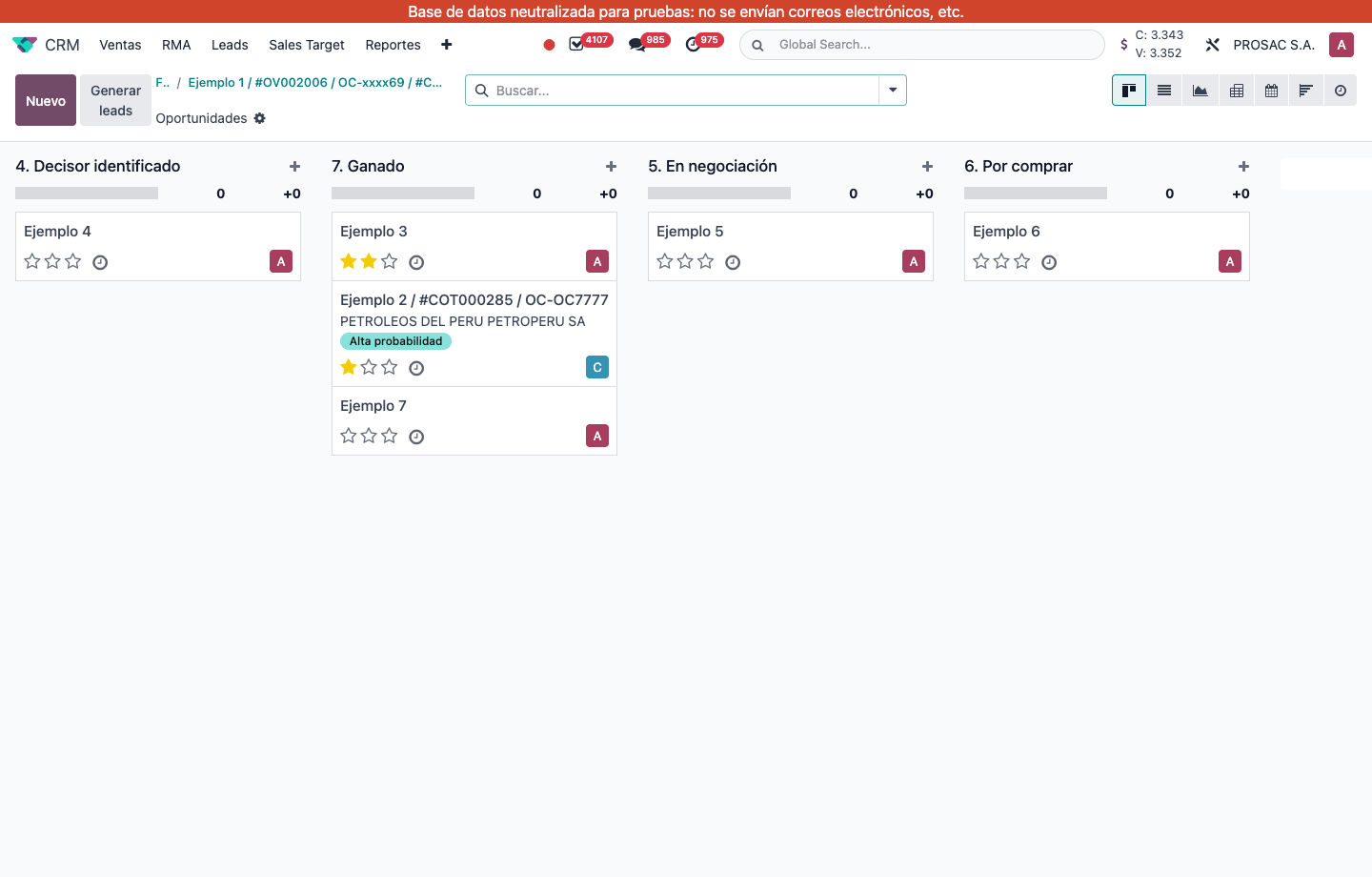
The six linked opportunities in Flujo, still in their pipeline stages.
When you search an opportunity by name, the same search also matches the related quotation number and the product names on those quotations.
Oportunidades vinculadas de CRM
Nombre técnico: cs_crm_linked_opportunity
Nombre
CRM Linked Opportunities
Resumen
Enlaza oportunidades relacionadas con referencias bidireccionales
Descripción
Permite relacionar una oportunidad con otras oportunidades abiertas del mismo cliente (o entidad comercial). El enlace se escribe en ambos lados. Un botón inteligente abre los registros relacionados. La búsqueda también considera el nombre de la cotización y los productos pedidos.
Autor
Cloudia
Copyright
Copyright (c) 2025-Present Cloudia Systems S.A.C.
Licencia
OPL-1
Versión
18.0.1.0
Dependencias
crm
sale_crm
1. Instrucciones de usuario
Vincular oportunidades del mismo cliente
Abra una oportunidad que ya tenga Contacto.
A la derecha, en Oportunidades vinculadas, elija una o más oportunidades.
Solo aparecen oportunidades activas de ese contacto o entidad comercial, con probabilidad mayor a 0.
Oportunidad 69: etiquetas de Oportunidades vinculadas (Ejemplo 3, Ejemplo 2, …) y el botón estrella con 6.
Guardar el enlace en A también agrega A en B. Quitar el enlace lo borra en ambos lados. El botón inteligente se oculta si el recuento es 0.
Abrir la lista vinculada
Pulse el botón estrella Oportunidades vinculadas.
Llega a la vista estándar de Oportunidades, filtrada a esos registros.
Las seis oportunidades vinculadas en Flujo, cada una en su etapa.
Al buscar una oportunidad por nombre, la misma búsqueda también encuentra el número de cotización relacionada y los nombres de producto de esas cotizaciones.