Adds clickable website links to products on Sales Order PDFs
Description
On the printed cotización / orden de venta, the product name on each line links to the product eCommerce page, with a small external-link icon. If the product has no website URL, the name stays plain text.
Author
Cloudia
Copyright
Copyright (c) 2025-Present Cloudia Systems S.A.C.
License
OPL-1
Version
18.0.1.3
Dependencies
website_sale
sale
sale_management
2. User instructions
No settings. Publish the product on the website so it has a store URL, then print or preview the cotización.
Open the PDF
Open a cotización that contains products with a website page.
Use Vista previa or print the report.
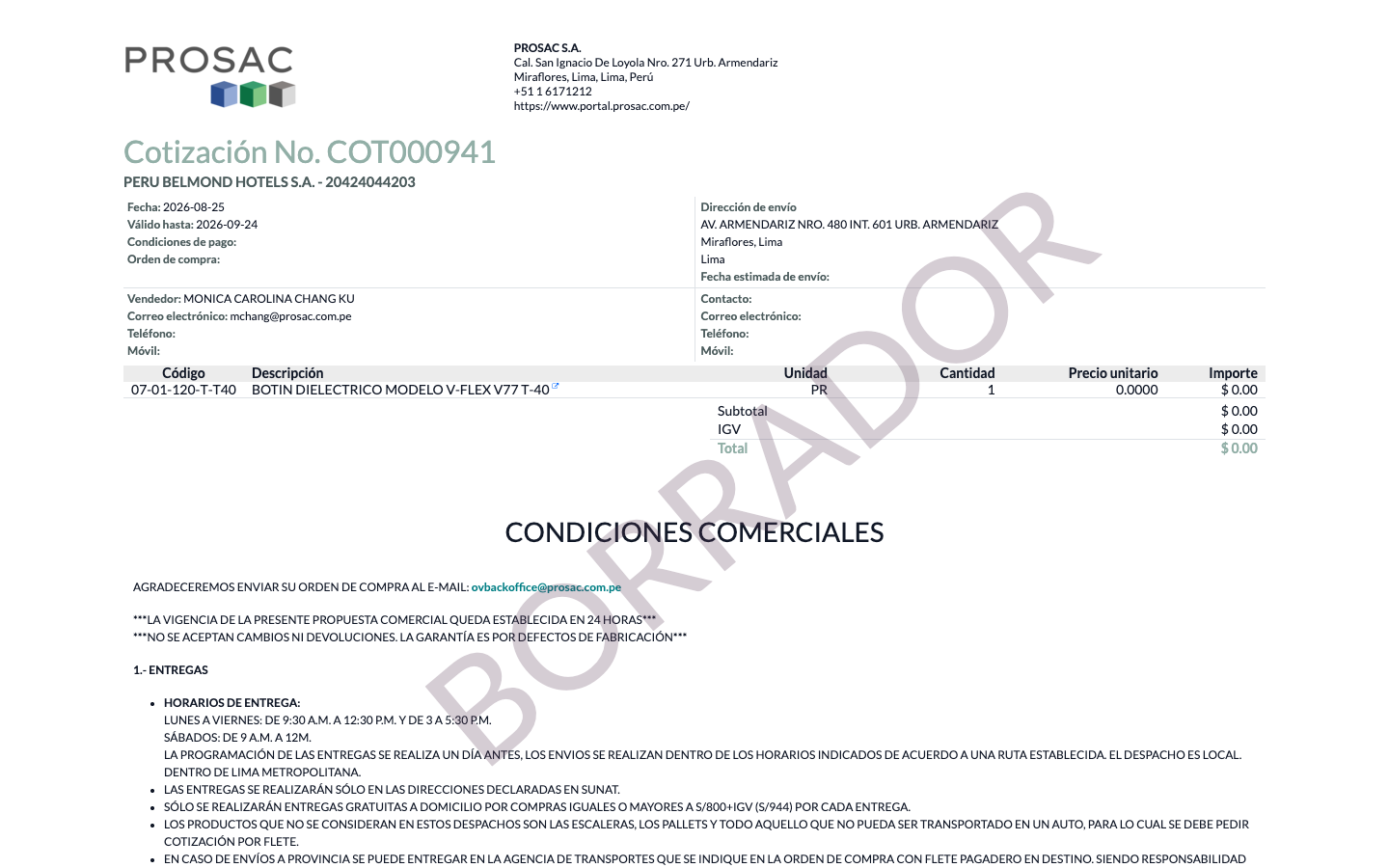
In the line table, the Descripción is a link. A small blue external-link icon sits next to the name (tooltip Ver en el sitio web / View on website).
COT000941 PDF. Descripción BOTIN DIELECTRICO… with the external-link icon. Columns: Código, Descripción, Unidad, Cantidad, Precio unitario, Importe.
Extra lines in the order-line description (after the first line) stay as smaller italic notes under the linked name. Lines without a product, or products without website_url, print as plain text.
Custom report layouts can reuse the QWeb templates product_name_with_url and sale_order_line_name_with_url. The standard sale report inherit is already active.
Enlace al eCommerce en el PDF de ventas
Nombre técnico: cs_sale_quotation_product_url
Nombre
Sales PDF link to eCommerce
Resumen
Agrega enlaces al sitio web en los productos del PDF de la orden de venta
Descripción
En la cotización / orden de venta impresa, el nombre del producto de cada línea enlaza a su ficha de eCommerce, con un icono de enlace externo. Si el producto no tiene URL web, el nombre queda como texto.
Autor
Cloudia
Copyright
Copyright (c) 2025-Present Cloudia Systems S.A.C.
Licencia
OPL-1
Versión
18.0.1.3
Dependencias
website_sale
sale
sale_management
2. Instrucciones de usuario
No hay ajustes. Publique el producto en el sitio para que tenga URL de tienda y luego imprima o previsualice la cotización.
Abra el PDF
Abra una cotización con productos que tengan ficha web.
Use Vista previa o imprima el reporte.
En la tabla, la Descripción es un enlace. Un icono azul de enlace externo aparece junto al nombre (ayuda Ver en el sitio web).
PDF de COT000941. Descripción BOTIN DIELECTRICO… con el icono de enlace externo. Columnas: Código, Descripción, Unidad, Cantidad, Precio unitario, Importe.
Las líneas extra de la descripción (después de la primera) quedan como notas en cursiva debajo del nombre enlazado. Líneas sin producto, o productos sin URL web, se imprimen como texto.
Los reportes a medida pueden reutilizar las plantillas QWeb product_name_with_url y sale_order_line_name_with_url. La herencia del reporte estándar de ventas ya está activa.