Assign the GRE number when marking a transfer To Deliver
Description
Extends the To Deliver (Por Despachar) action so outgoing and internal transfers receive l10n_latam_document_number from the operation type SUNAT sequence before the status change. Existing numbers are kept. The SUNAT code on the operation type is required. Auto-installs with its dependencies.
Author
Cloudia
Copyright
Copyright (c) 2025-Present Cloudia Systems S.A.C.
License
OPL-1
Version
18.0.1.0
Dependencies
l10n_pe_edi_stock
l10n_pe_cs_edi_stock
cs_stock_to_deliver
l10n_pe_cs_api_settings
1. Configuration
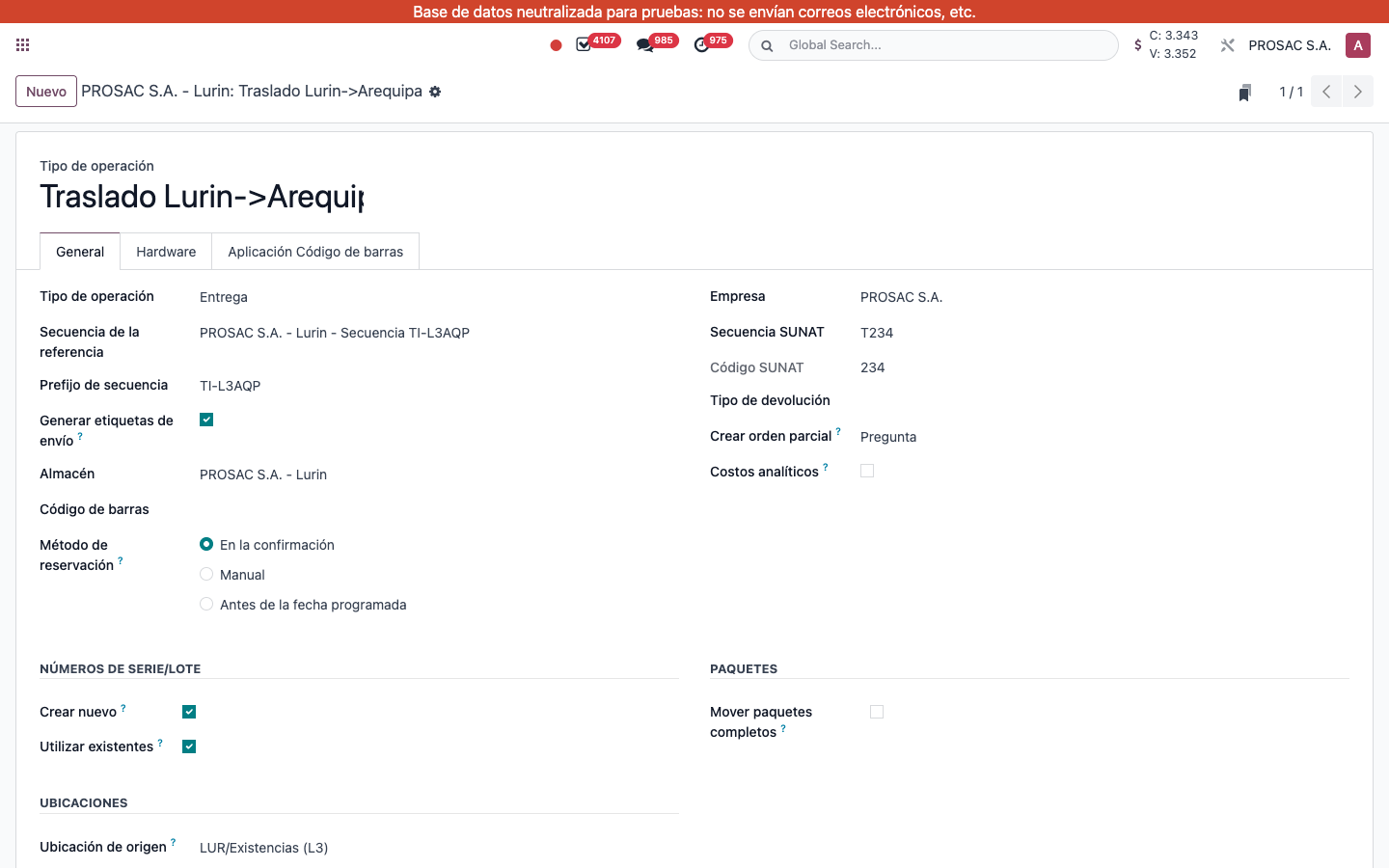
Same SUNAT series as l10n_pe_cs_edi_stock: on the operation type set Secuencia SUNAT and a 3-character Código SUNAT. Without it, Despachar raises: Por favor, establezca el código SUNAT en el tipo de operación %s.
Tipo de operación. Secuencia SUNAT T234. Código SUNAT 234. Required before Despachar assigns a GRE number.
2. User instructions
Assign the GRE number with Despachar
Open an outgoing or inter-warehouse transfer in Disponible / reserved (warehouse mode from cs_stock_to_deliver).
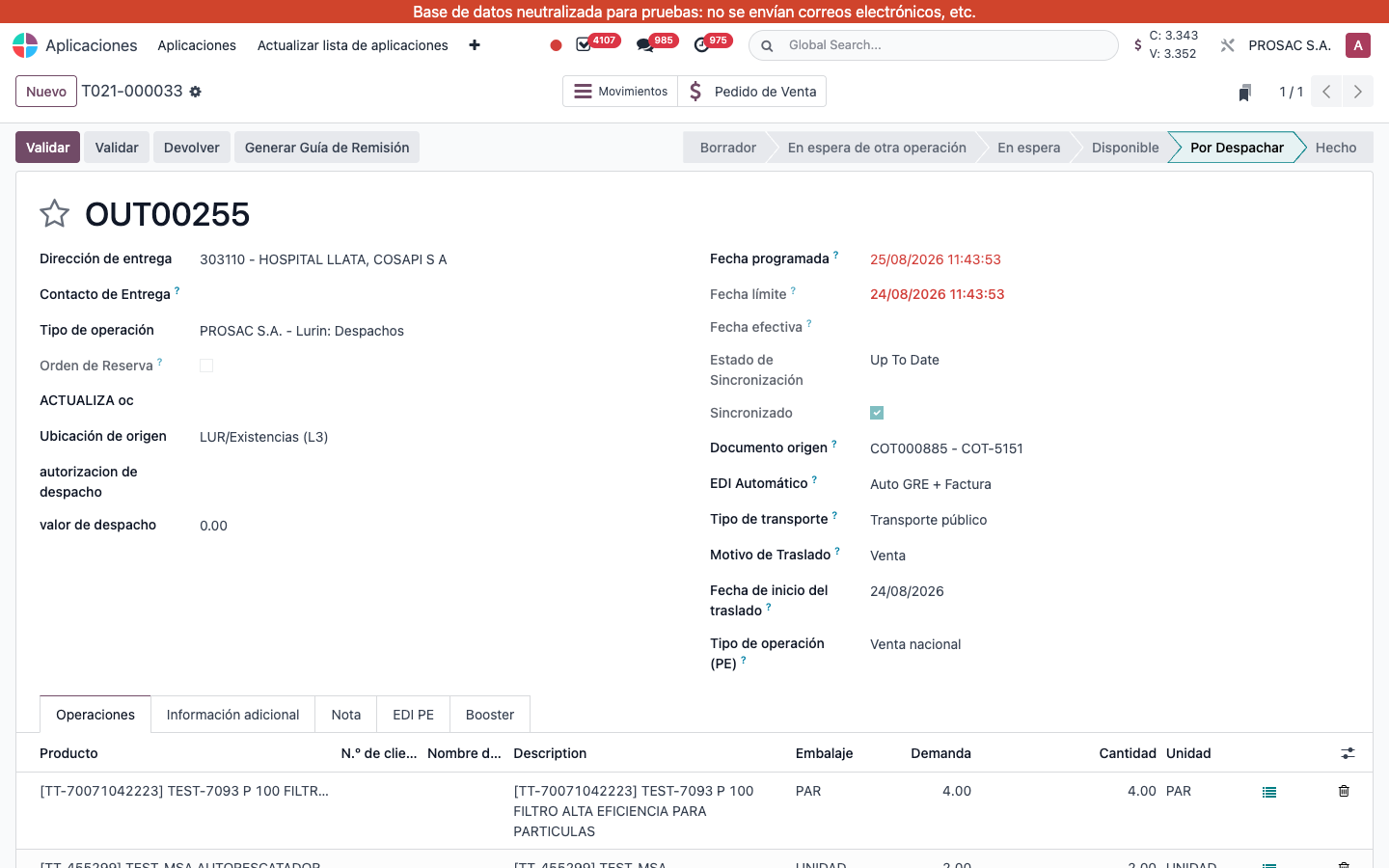
Enter done quantities and click Despachar. This module assigns the next number from Secuencia SUNAT to Número de documento if it is empty (example OUT00255 → T021-000033).
Status becomes Por Despachar. Validar and Generar Guía de Remisión remain available afterwards.
If the transfer already has a GRE number, it is left unchanged. Incoming/manufacturing types are not numbered here.
Entregas / T021-000033 (OUT00255). Status Por Despachar. Origin COT000885. Button Generar Guía de Remisión. Pedido de Venta smart button.
Despacho programado con guía GRE — Perú
Nombre técnico: l10n_pe_cs_edi_stock_to_deliver
Nombre
Despacho Programado con Guía GRE - Perú
Resumen
Genera el número de guía de remisión electrónica al programar el despacho
Descripción
Extiende la acción Por Despachar para asignar l10n_latam_document_number desde la secuencia SUNAT del tipo de operación en salidas y traslados internos, antes de cambiar el estado. Conserva un número ya asignado. El código SUNAT del tipo de operación es obligatorio. Se autoinstala con sus dependencias.
Autor
Cloudia
Copyright
Copyright (c) 2025-Present Cloudia Systems S.A.C.
Licencia
OPL-1
Versión
18.0.1.0
Dependencias
l10n_pe_edi_stock
l10n_pe_cs_edi_stock
cs_stock_to_deliver
l10n_pe_cs_api_settings
1. Configuración
La misma serie SUNAT que l10n_pe_cs_edi_stock: en el tipo de operación defina Secuencia SUNAT y Código SUNAT de 3 caracteres. Si falta, Despachar muestra: Por favor, establezca el código SUNAT en el tipo de operación %s.
Tipo de operación. Secuencia SUNAT T234. Código SUNAT 234.
2. Instrucciones de usuario
Asignar el número GRE al despachar
Abra un traslado de salida o entre almacenes en Disponible.
Cargue cantidades hechas y pulse Despachar. Este módulo asigna el siguiente número de Secuencia SUNAT si está vacío (ejemplo OUT00255 → T021-000033).
El estado pasa a Por Despachar. Luego puede Validar y Generar Guía de Remisión.
Si ya hay número de GRE, se conserva. Entradas y fabricación no se numeran aquí.
Entregas / T021-000033 (OUT00255). Estado Por Despachar. Origen COT000885.