Auto-selects quotation pricelist matching the CRM opportunity currency
Description
When you create a cotización from an opportunity, the quotation takes the pricelist whose currency matches Moneda on that opportunity (for the same company). The quotation currency then follows the pricelist. Nothing is forced after the document leaves draft.
Author
Cloudia
Copyright
Copyright (c) 2025-Present Cloudia Systems S.A.C.
License
OPL-1
Version
18.0.1.0
Dependencies
sale_crm
cs_crm_currency
1. Configuration
Keep one sales pricelist per currency the team uses on opportunities. Live example: SOLES (PEN) and DOLARES (USD), both for the order company (or with no company).
Open Ventas → Configuración → Lista de precios.
Check that each CRM currency has a matching Lista de Precios.
2. User instructions
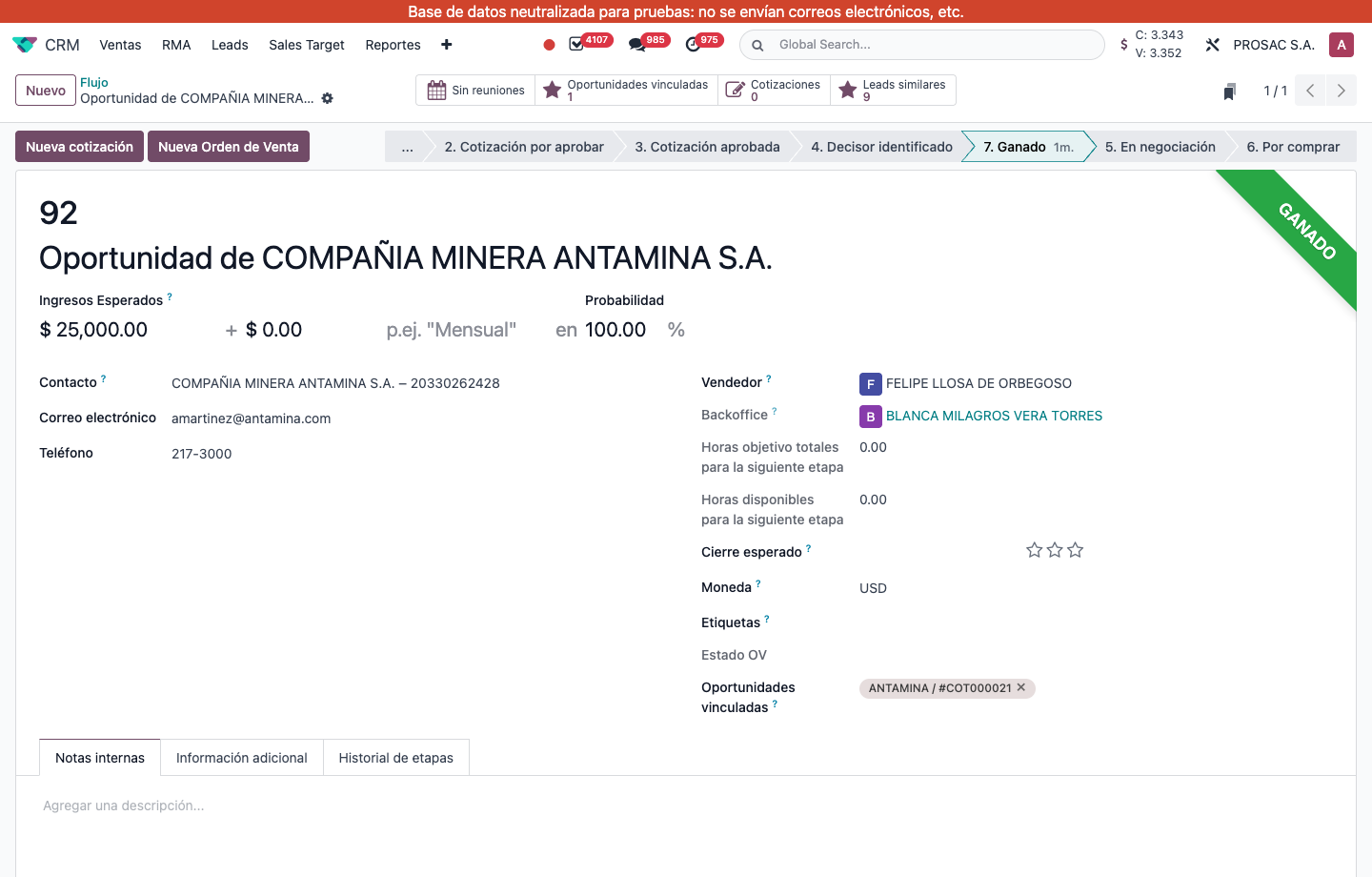
On the opportunity, set Moneda (for example USD).
Click Nueva cotización.
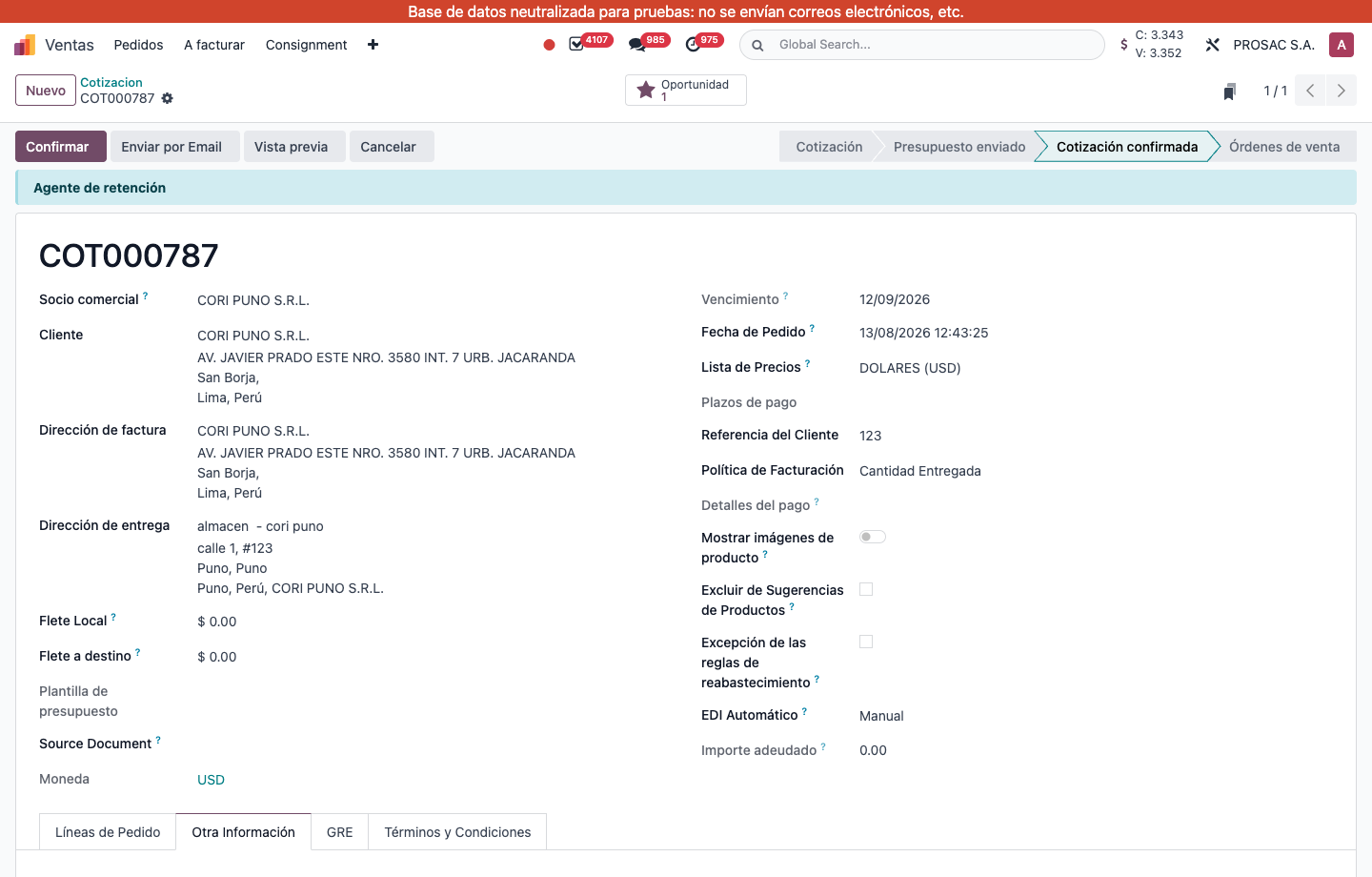
On the new quotation, confirm Lista de Precios is the list of that currency (example: DOLARES (USD)) and Moneda matches.
Opportunity with Moneda USD. A quotation created from here looks up a USD pricelist while it is still in Cotización (draft).COT000787 linked to an opportunity: Lista de Precios DOLARES (USD) and Moneda USD, on the Otra información page.
The match runs only while the quotation is in Cotización (draft). After Presupuesto enviado or Cotización confirmada, changing the opportunity currency does not rewrite the pricelist. If no pricelist exists for that currency, standard Odoo pricelist logic stays in place.
Lista de precios de la cotización según la moneda del CRM
Nombre técnico: cs_crm_currency_pricelist
Nombre
CRM Currency to Quotation Pricelist
Resumen
La cotización creada desde una oportunidad usa la lista de precios de la moneda del CRM
Descripción
Al crear una cotización desde una oportunidad, se elige la lista de precios cuya moneda coincide con Moneda de esa oportunidad (de la misma compañía). La moneda de la cotización sigue a la lista. No se fuerza nada cuando el documento ya no está en borrador.
Autor
Cloudia
Copyright
Copyright (c) 2025-Present Cloudia Systems S.A.C.
Licencia
OPL-1
Versión
18.0.1.0
Dependencias
sale_crm
cs_crm_currency
1. Configuración
Mantenga una lista de precios de venta por cada moneda que el equipo use en oportunidades. Ejemplo en vivo: SOLES (PEN) y DOLARES (USD), de la compañía del pedido (o sin compañía).
Abra Ventas → Configuración → Lista de precios.
Compruebe que cada moneda del CRM tenga su Lista de Precios.
2. Instrucciones de usuario
En la oportunidad, elija Moneda (por ejemplo USD).
Pulse Nueva cotización.
En la cotización nueva, confirme que Lista de Precios es la de esa moneda (ejemplo: DOLARES (USD)) y que Moneda coincide.
Oportunidad con Moneda USD. La cotización creada desde aquí busca una lista en USD mientras sigue en Cotización (borrador).COT000787 vinculada a una oportunidad: Lista de Precios DOLARES (USD) y Moneda USD, en Otra información.
El cruce solo corre mientras la cotización está en Cotización (borrador). Después de Presupuesto enviado o Cotización confirmada, cambiar la moneda de la oportunidad no reescribe la lista. Si no hay lista para esa moneda, sigue la lógica nativa de Odoo.