When a line’s quantity (converted to the product unit) is below that vendor’s minimum (also converted), a red banner lists every offending line:
La Orden de Compra está por debajo de la cantidad mínima requerida:
Each line is formatted as Product "…": Quantity … … is below minimum … … (the line template is not translated in es_PE; the header is).
No existing orden de compra in this database currently triggers the banner, so there is no live shot of the warning. The check is a warning only — it does not block confirm. Changing vendor re-evaluates the minimum. If the flag is off, or there is no vendor pricelist for that partner, the line is skipped.
Cantidad mínima de compra
Nombre técnico: cs_purchase_min_qty
Nombre
Purchase Minimum Quantity
Resumen
Establecer cantidad mínima para orden de compra por producto y proveedor
Descripción
Permite exigir, por producto y proveedor, la cantidad mínima de una línea de orden de compra y avisa al comprador si no se cumple.
Autor
Cloudia
Copyright
Copyright (c) 2025-Present Cloudia Systems S.A.C.
Licencia
OPL-1
Versión
18.0.1.0
Dependencias
product
purchase
2. Instrucciones de usuario
Activar el mínimo en un producto
Abra el producto y vaya a Compra.
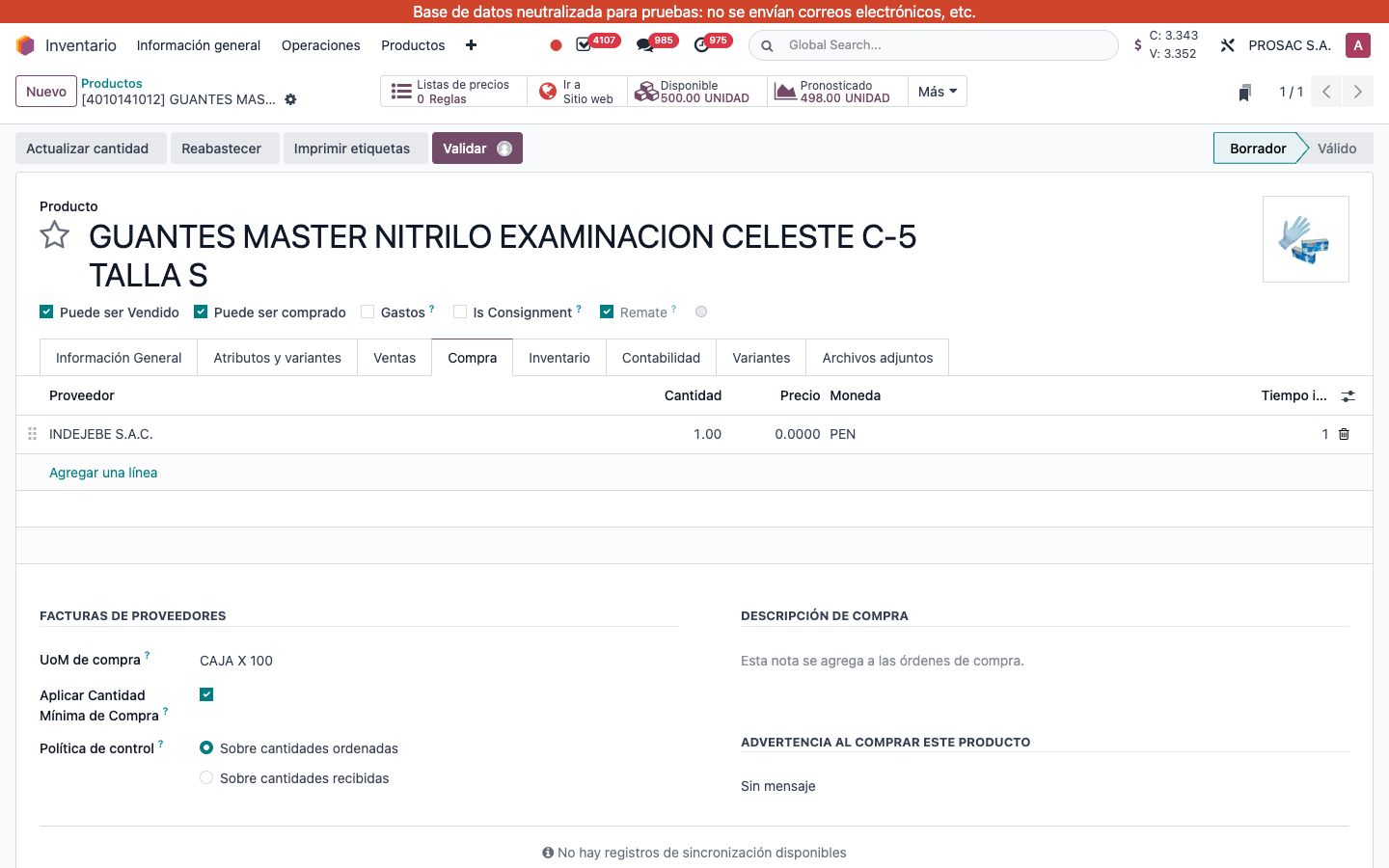
En la tabla de proveedores, ponga en Cantidad el mínimo del proveedor (cantidad mínima estándar de la tarifa; ejemplo en vivo INDEJEBE S.A.C. = 1.00).
Marque Aplicar Cantidad Mínima de Compra (en FACTURAS DE PROVEEDORES, junto a UoM de compra).
Producto 4010141012, pestaña Compra. Aplicar Cantidad Mínima de Compra activo; Cantidad del proveedor 1.00.
Aviso en la orden de compra
Si la cantidad de una línea (convertida a la unidad del producto) es menor al mínimo de ese proveedor (también convertido), un aviso rojo lista cada línea:
La Orden de Compra está por debajo de la cantidad mínima requerida:
Cada línea se formatea como Product "…": Quantity … … is below minimum … … (esa plantilla no está traducida en es_PE; el encabezado sí).
Ninguna orden de compra actual de esta base dispara el aviso, por eso no hay captura en vivo del banner. Solo es una advertencia: no bloquea confirmar. Cambiar de proveedor vuelve a calcular el mínimo. Si la casilla está apagada, o no hay tarifa de ese proveedor, la línea se omite.