Requires manager approval on quotations/orders above a total threshold
Description
Adds Studio approval rules that require manager approval on sale orders whose untaxed total exceeds a configurable threshold, before sending the quotation and/or confirming the order.
Author
Cloudia
Copyright
Copyright (c) 2025-Present Cloudia Systems S.A.C.
License
OPL-1
Version
18.0.1.0
Dependencies
sale
cs_sale_approval_base
1. Configuration
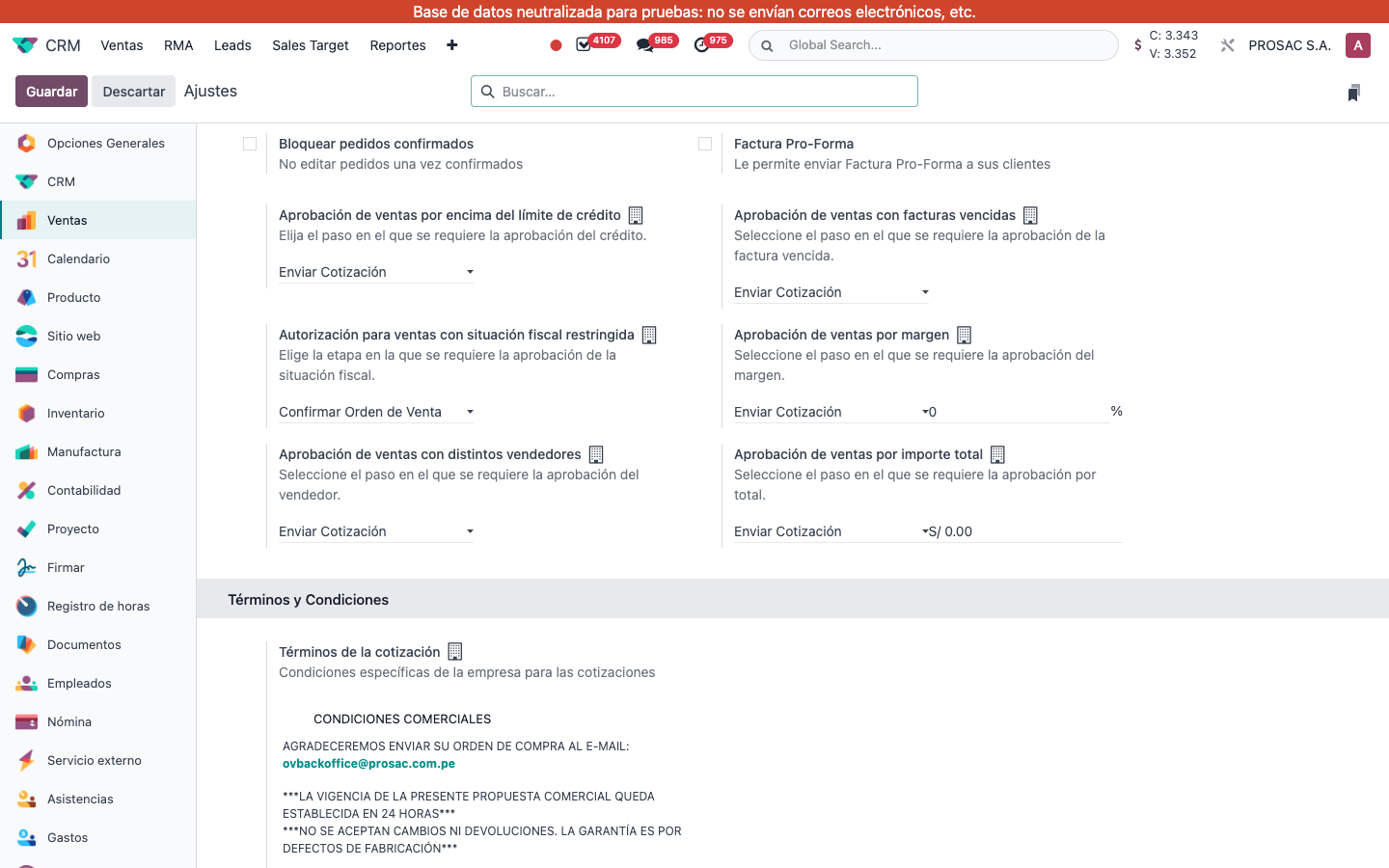
In Ajustes → Ventas, under Cotizaciones y órdenes, use Aprobación de ventas por importe total.
Choose the step: Enviar Cotización, Confirmar Orden de Venta, or Ambos. Live: Enviar Cotización.
Set the monetary threshold next to it (live label of the amount field: Límite de aprobación de venta). Help: Seleccione el paso en el que se requiere la aprobación por total.
A threshold of S/ 0.00 (or negative) never triggers. Live PROSAC S.A. is at 0, so no total banner appears even on large cotizaciones.
Ajustes → Ventas. Aprobación de ventas por importe total = Enviar Cotización, threshold S/ 0.00.
Changing the threshold or the step recalculates open cotizaciones. Immediate payment terms (100% due on the invoice date, e.g. live Inmediato) are exempt even above the limit.
2. User instructions
When the untaxed total of a draft/sent cotización is above the threshold and the payment term is not immediate, the banner is Requiere aprobación: El monto total supera el límite establecido. Then use Solicitar aprobación / Aprobar from the base approval module before send or confirm, according to the setting.
Adding, changing or deleting lines, or changing partner / payment term, refreshes the flags. Studio messages: El total de la cotización supera el límite: Aprobación para enviar and El total de la cotización supera el límite: Se requiere aprobación para confirmar. Group: Administrador de ventas.
Aprobación de venta por importe total
Nombre técnico: cs_sale_approval_total
Nombre
Sale Approval by Total Amount
Resumen
Exige aprobación de un gerente en cotizaciones/órdenes por encima de un umbral de total
Descripción
Agrega reglas de aprobación Studio que piden visto bueno de un gerente cuando el total sin impuestos de la orden de venta supera un umbral configurable, antes de enviar la cotización y/o confirmar la orden.
Autor
Cloudia
Copyright
Copyright (c) 2025-Present Cloudia Systems S.A.C.
Licencia
OPL-1
Versión
18.0.1.0
Dependencias
sale
cs_sale_approval_base
1. Configuración
En Ajustes → Ventas, en Cotizaciones y órdenes, use Aprobación de ventas por importe total.
Elija el paso: Enviar Cotización, Confirmar Orden de Venta o Ambos. En vivo: Enviar Cotización.
Indique el umbral monetario (campo Límite de aprobación de venta). Ayuda: Seleccione el paso en el que se requiere la aprobación por total.
Con S/ 0.00 (o negativo) no se dispara nunca. En PROSAC S.A. el umbral está en 0, así que no hay aviso de total ni en cotizaciones grandes.
Ajustes → Ventas. Aprobación de ventas por importe total = Enviar Cotización, umbral S/ 0.00.
Cambiar el umbral o el paso recalcula las cotizaciones abiertas. Los plazos de pago inmediatos (100 % al día de la factura, p. ej. Inmediato) quedan exentos aunque superen el límite.
2. Instrucciones de usuario
Cuando el total sin impuestos de una cotización en borrador/enviada supera el umbral y el plazo no es inmediato, el aviso es Requiere aprobación: El monto total supera el límite establecido. Use Solicitar aprobación / Aprobar del módulo base antes de enviar o confirmar, según el ajuste.
Agregar, cambiar o borrar líneas, o cambiar cliente / plazo de pago, refresca las marcas. Mensajes de Studio: El total de la cotización supera el límite: Aprobación para enviar y El total de la cotización supera el límite: Se requiere aprobación para confirmar. Grupo: Administrador de ventas.