Warn when a sale order line is below the product minimum quantity
Description
Lets you enforce, per product, the minimum quantity a sale order line must reach, warning the salesperson when it is not met.
Author
Cloudia
Copyright
Copyright (c) 2025-Present Cloudia Systems S.A.C.
License
OPL-1
Version
18.0.1.0
Dependencies
sale
cs_sale_uom
1. Configuration
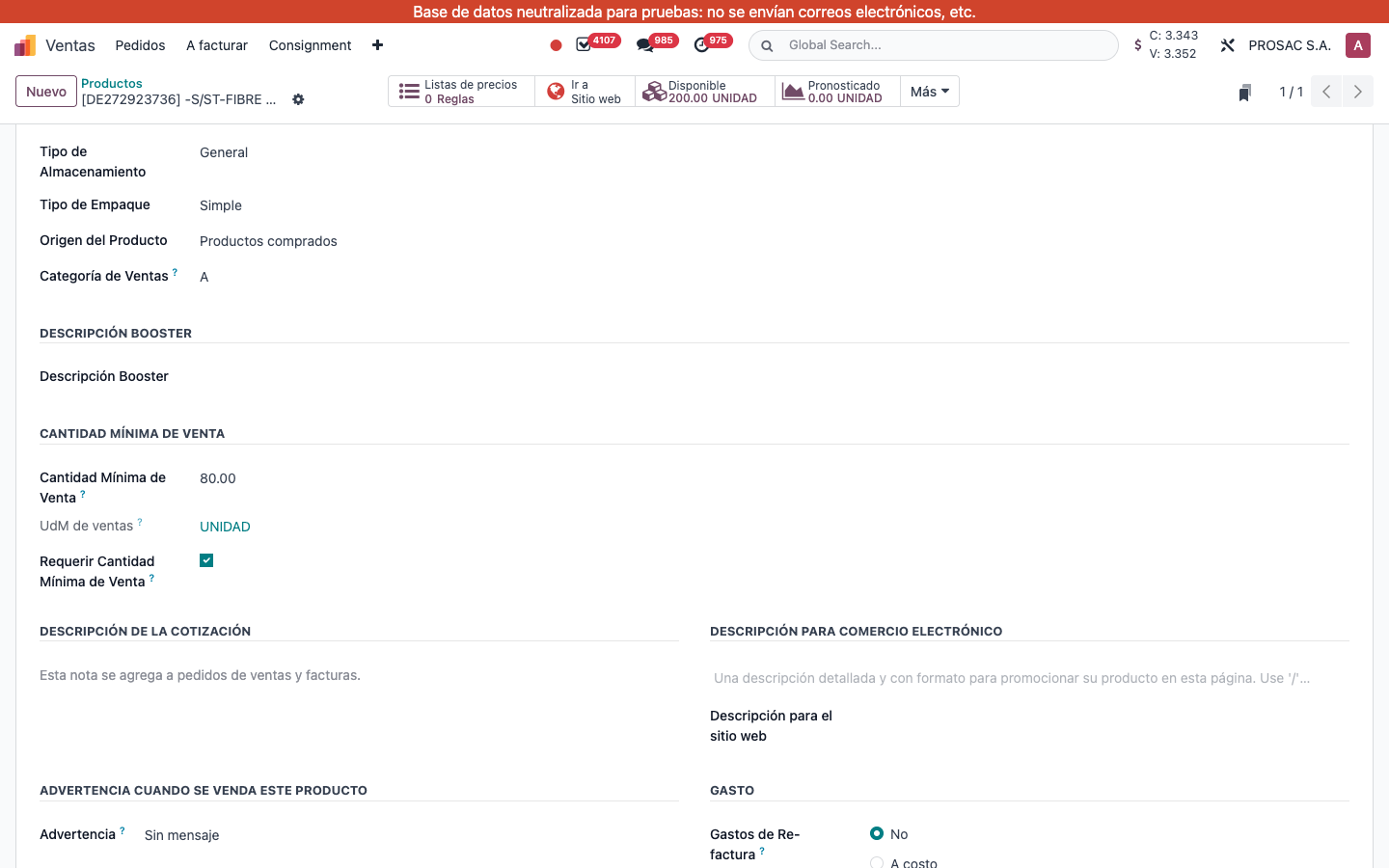
On the product, tab Ventas, group CANTIDAD MÍNIMA DE VENTA:
Set Cantidad Mínima de Venta (example: 80.00).
Check Requerir Cantidad Mínima de Venta. Without this checkbox there is no warning, even if a minimum is filled.
UdM de ventas is shown read-only; the check converts line qty and the minimum to the product unit of measure.
Product Sales tab. CANTIDAD MÍNIMA DE VENTA, Cantidad Mínima de Venta 80.00, UdM de ventas UNIDAD, Requerir Cantidad Mínima de Venta on.
2. User instructions
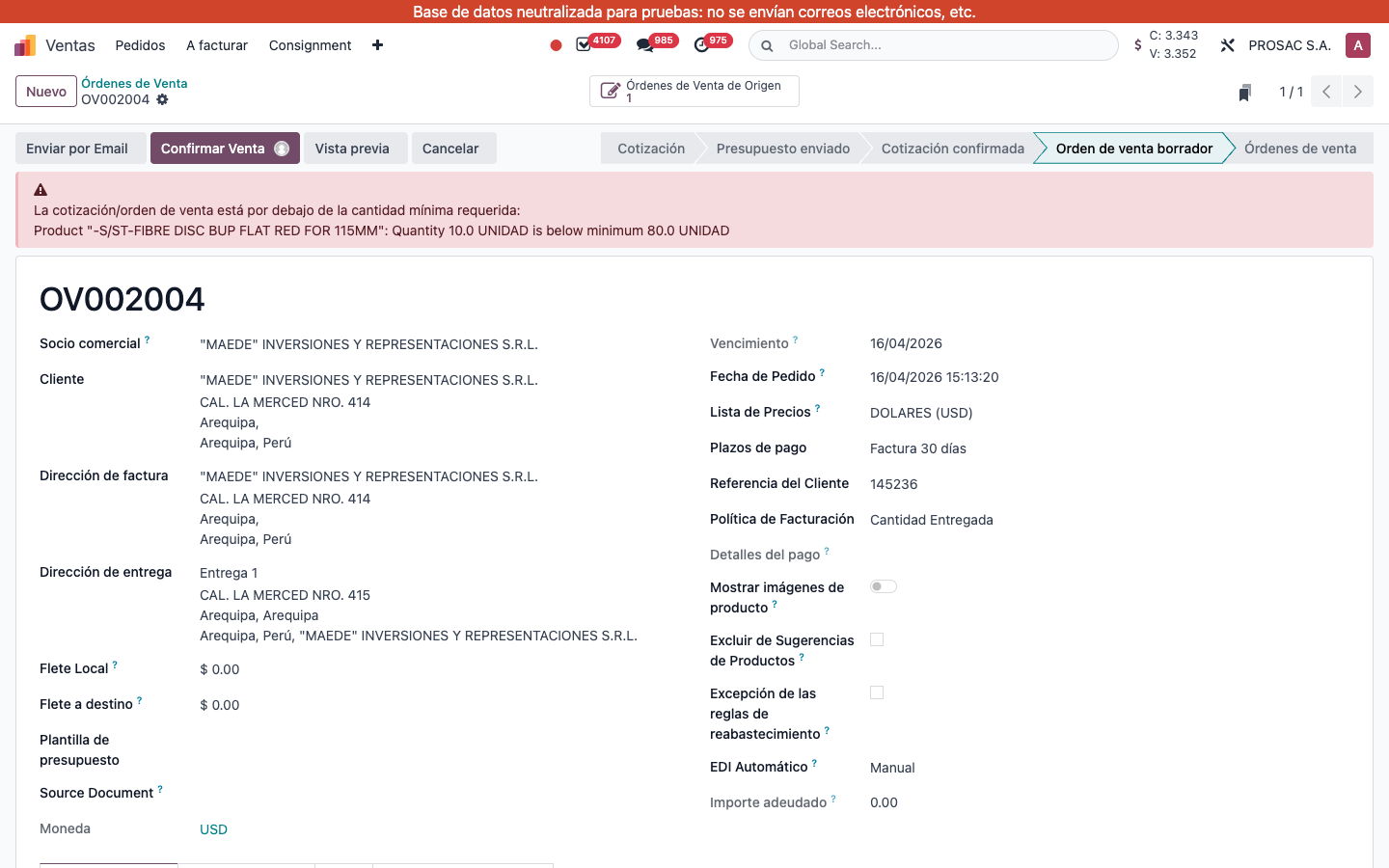
When any line of a cotización or orden de venta is below its product minimum (and the product has Requerir Cantidad Mínima de Venta), a red banner appears at the top of the form. It does not block confirm.
Open the order (example: OV002004, 10 UNIDAD vs minimum 80).
Read the banner: La cotización/orden de venta está por debajo de la cantidad mínima requerida: then one row per product.
Raise the line Cantidad (or turn off the product checkbox) until the banner disappears.
OV002004. Banner with the translated header; the per-product line is still in English on this database (Quantity … is below minimum).
Cantidad mínima de venta
Nombre técnico: cs_sale_min_qty
Nombre
Sale Minimum Quantity
Resumen
Advierte cuando una línea de la orden de venta está bajo la cantidad mínima del producto
Descripción
Permite fijar, por producto, la cantidad mínima que debe alcanzar una línea y avisa al vendedor si no se cumple.
Autor
Cloudia
Copyright
Copyright (c) 2025-Present Cloudia Systems S.A.C.
Licencia
OPL-1
Versión
18.0.1.0
Dependencias
sale
cs_sale_uom
1. Configuración
En el producto, pestaña Ventas, grupo CANTIDAD MÍNIMA DE VENTA:
Indique Cantidad Mínima de Venta (ejemplo: 80.00).
Marque Requerir Cantidad Mínima de Venta. Sin la casilla no hay aviso, aunque haya mínimo.
UdM de ventas se muestra en solo lectura; la validación convierte cantidad de línea y mínimo a la unidad del producto.
Pestaña Ventas. CANTIDAD MÍNIMA DE VENTA, Cantidad Mínima de Venta 80.00, UdM de ventas UNIDAD, Requerir Cantidad Mínima de Venta activo.
2. Instrucciones de usuario
Si alguna línea de la cotización u orden de venta está bajo el mínimo del producto (y el producto tiene Requerir Cantidad Mínima de Venta), aparece un aviso rojo arriba del formulario. No bloquea la confirmación.
Abra la orden (ejemplo: OV002004, 10 UNIDAD frente a mínimo 80).
Lea el aviso: La cotización/orden de venta está por debajo de la cantidad mínima requerida: y una fila por producto.
Suba la Cantidad de la línea (o quite la casilla del producto) hasta que desaparezca el aviso.
OV002004. Encabezado traducido; la línea por producto sigue en inglés en esta base (Quantity … is below minimum).