Creates and links an invoice to the GRE before sending it
Description
Extends automatic GRE sending with Auto GRE + Invoice on delivery guides, sales orders and warehouses.
- Before sending the GRE to SUNAT, creates the invoice from the linked sales order and posts it.
- Links the posted invoice to the delivery via the electronic document selector.
- If there are no invoiceable lines, GRE sending continues without an invoice.
- If posting fails, the draft invoice is cancelled, GRE is not sent, and the responsible user is emailed.
Author
Cloudia
Copyright
Copyright (c) 2025-Present Cloudia Systems S.A.C.
License
OPL-1
Version
18.0.1.0
Dependencies
sale
l10n_pe_cs_edi_stock_auto
l10n_pe_cs_edi_stock
1. Configuration
Set the warehouse default so new quotations inherit it.
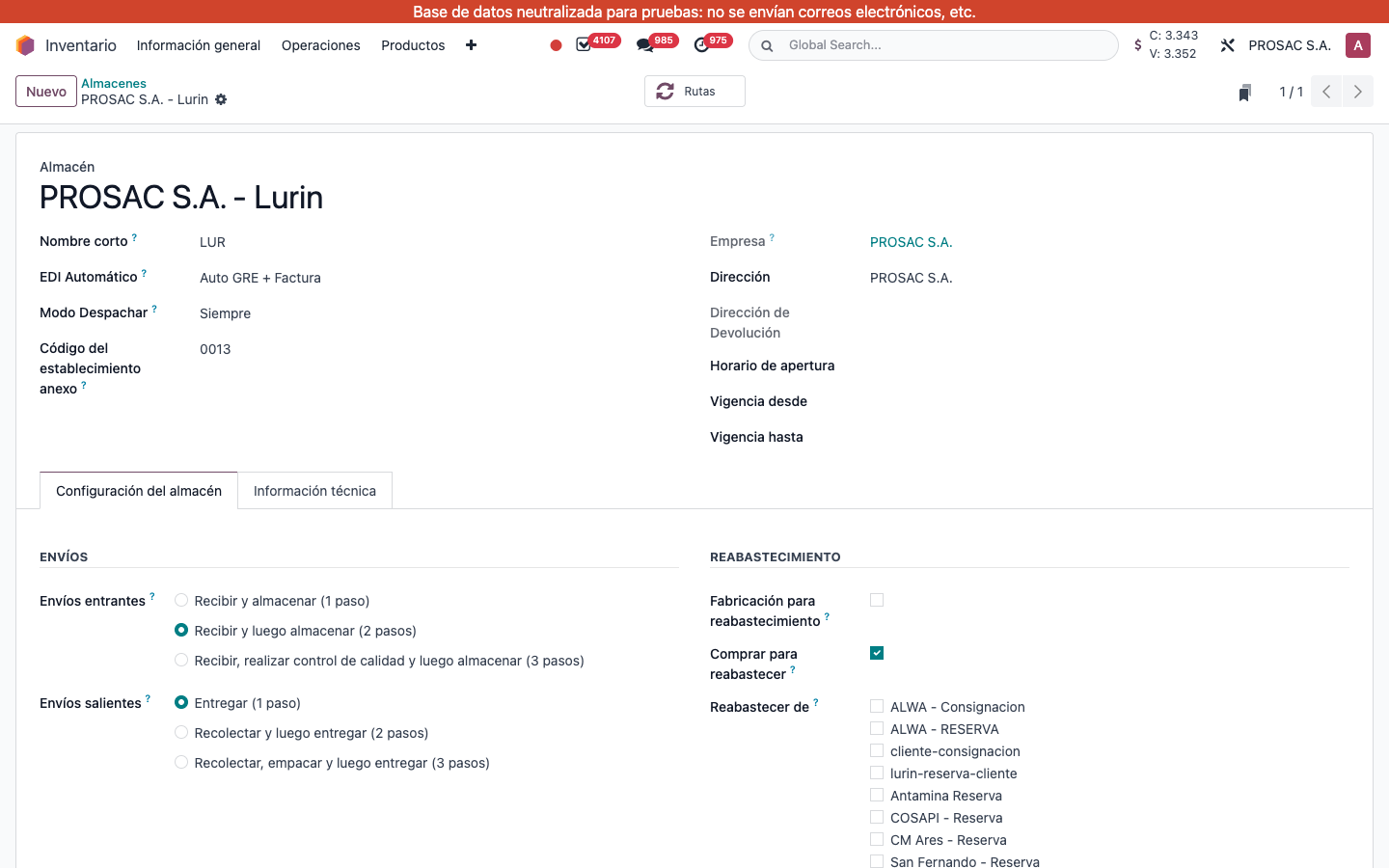
Open Inventario > Almacenes.
On the warehouse form, set EDI Automático to Auto GRE + Factura.
Warehouse PROSAC S.A. - Lurin: EDI Automático = Auto GRE + Factura.
That value is copied to new órdenes de venta at creation, then to outgoing deliveries.
2. User instructions
Override on a quotation or sales order
Open the Cotización or Orden de venta.
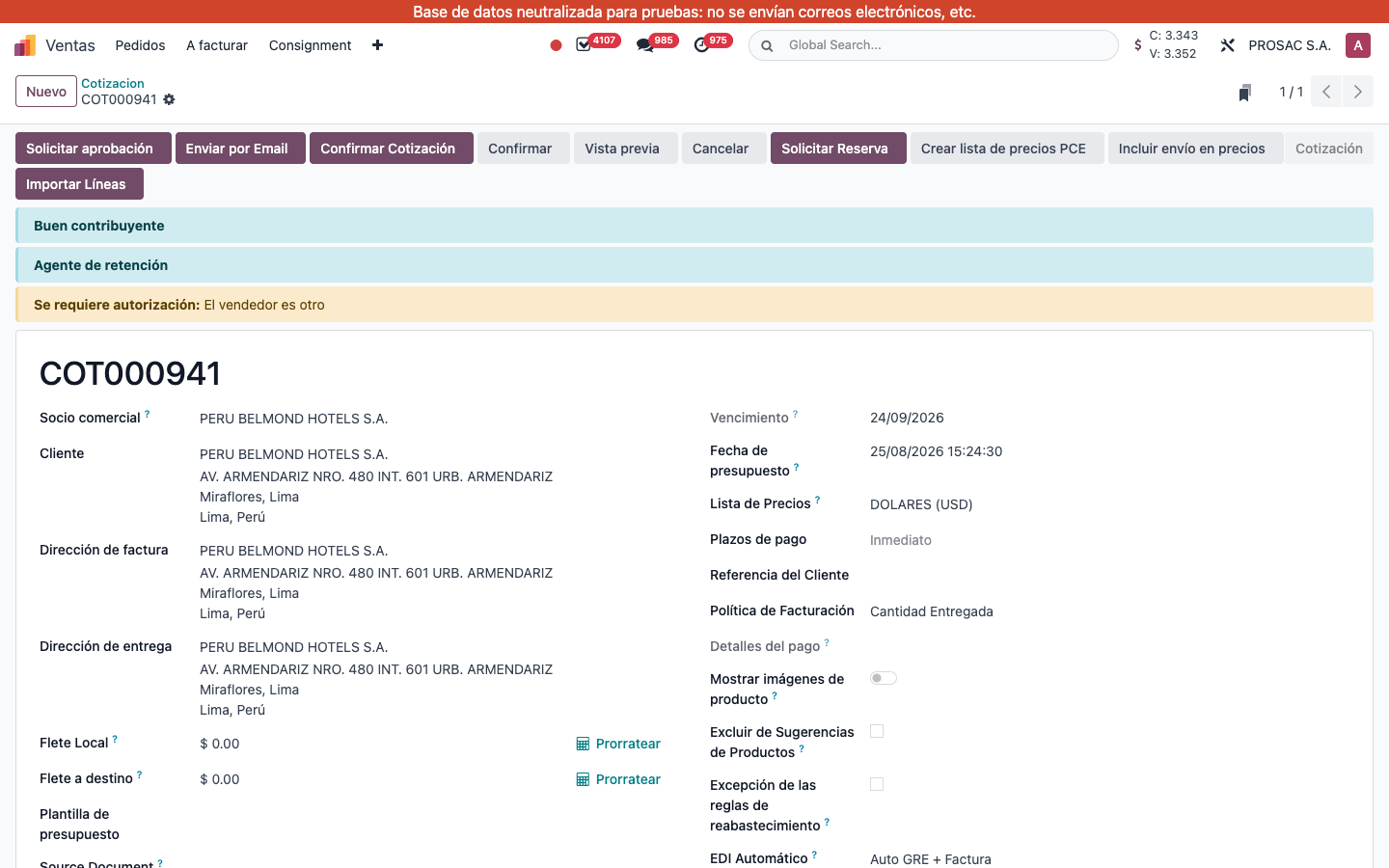
On the right of the header, set EDI Automático to Auto GRE + Factura (or leave the warehouse default).
COT000941: field EDI Automático set to Auto GRE + Factura.
What happens on the delivery
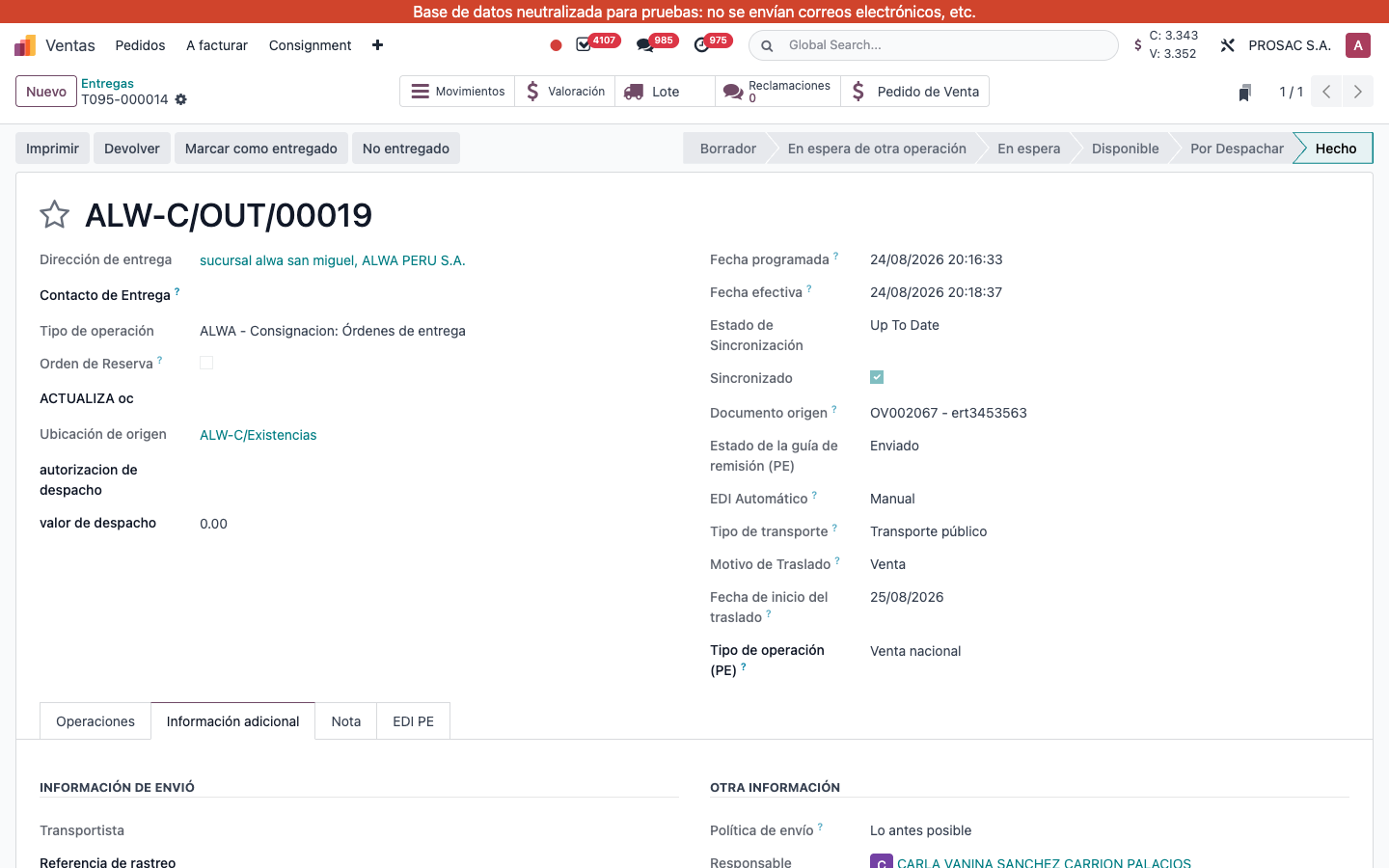
On an outgoing picking, EDI Automático sits under Estado de la guía de remisión (PE). It is locked once the GRE status is Enviado.
Delivery T095-000014: Estado de la guía de remisión (PE) = Enviado, EDI Automático = Manual.
When the picking is Hecho, GRE data is complete and the mode is Auto GRE + Factura:
Odoo creates the invoice from the linked orden de venta (qty delivered) and posts it.
The posted invoice is written on the picking electronic-document selector so the GRE XML can reference it.
Then the GRE is sent to SUNAT as usual.
The delivery must have a linked sales order. If the invoice has no lines, the draft is cancelled and GRE still goes out. If posting fails, the draft is cancelled, GRE is not sent, and the picking responsible receives email Fallo en el Envío Automático GRE + Factura (subject Fallo en el Envío Automático GRE + Factura: {picking}) with Orden de Entrega, Documento de Origen, Cliente, Responsable and Detalle del Error.
Facturación automática con GRE — Perú
Nombre técnico: l10n_pe_cs_edi_auto
Nombre
Facturación Automática con GRE - Perú
Resumen
Crea y vincula automáticamente una factura a la GRE antes de enviarla
Descripción
Extiende el envío automático de GRE con el modo Auto GRE + Factura en guías de remisión, órdenes de venta y almacenes.
- Antes de transmitir la GRE a SUNAT, crea la factura desde la orden de venta vinculada y la valida.
- Enlaza la factura publicada a la guía mediante el selector de documento electrónico.
- Si no hay líneas facturables, continúa el envío de la GRE sin factura.
- Si falla la validación de la factura, cancela el borrador, detiene la GRE y notifica por correo al responsable.
Autor
Cloudia
Copyright
Copyright (c) 2025-Present Cloudia Systems S.A.C.
Licencia
OPL-1
Versión
18.0.1.0
Dependencias
sale
l10n_pe_cs_edi_stock_auto
l10n_pe_cs_edi_stock
1. Configuración
Defina el valor del almacén para que las cotizaciones nuevas lo hereden.
Abra Inventario > Almacenes.
En el almacén, ponga EDI Automático en Auto GRE + Factura.
Almacén PROSAC S.A. - Lurin: EDI Automático = Auto GRE + Factura.
Ese valor se copia a las órdenes de venta nuevas y luego a las entregas de salida.
2. Instrucciones de usuario
Cambiarlo en una cotización u orden de venta
Abra la Cotización o la Orden de venta.
A la derecha del encabezado, ponga EDI Automático en Auto GRE + Factura (o deje el valor del almacén).
COT000941: campo EDI Automático en Auto GRE + Factura.
Qué ocurre en la entrega
En una entrega de salida, EDI Automático está bajo Estado de la guía de remisión (PE). Queda bloqueado cuando el estado GRE es Enviado.
Entrega T095-000014: Estado de la guía de remisión (PE) = Enviado, EDI Automático = Manual.
Cuando la entrega está Hecho, los datos GRE están completos y el modo es Auto GRE + Factura:
Odoo crea la factura desde la orden de venta vinculada (cantidad entregada) y la publica.
La factura publicada se escribe en el selector de documento electrónico de la entrega para que el XML GRE la referencie.
Luego se envía la GRE a SUNAT.
La entrega debe tener una orden de venta vinculada. Si la factura no tiene líneas, se cancela el borrador y la GRE sigue. Si falla la publicación, se cancela el borrador, no se envía la GRE y el responsable recibe el correo Fallo en el Envío Automático GRE + Factura (asunto Fallo en el Envío Automático GRE + Factura: {picking}) con Orden de Entrega, Documento de Origen, Cliente, Responsable y Detalle del Error.